



 GPro 100W
 GA 100W
 GA 60W
 GM Pro 60W
 Reno 65W
 Reno 65W Pro

Laser Engraver Machine for Metal: Tips to Achieve Darker and Clearer Engravings
8%
off
Hurry! Offer Ends Soon!
CODE: AUBLOG888
COPY
CODE
CODE
Metal engraving is one of the most profitable and professional applications in the laser industry. Whether you're marking tools, creating jewellery, engraving logos, or producing industrial identification tags, getting sharp and dark results is always the goal. Many users invest in a laser engraver machine for metal but struggle with marks that appear too light, inconsistent, or difficult to read.
If you've been wondering how to darken laser engraving on metal, the answer usually comes down to proper machine settings, material preparation, and using the right technology. A quality laser engraver machine for metal can produce deep black markings, high-contrast logos, and even colour markings on certain metals when configured correctly.
In this guide, we'll cover practical methods that professionals use when learning how to darken laser engraving on metal. We'll also explore why choosing the right laser engraver machine for metal can make a massive difference in your final results.
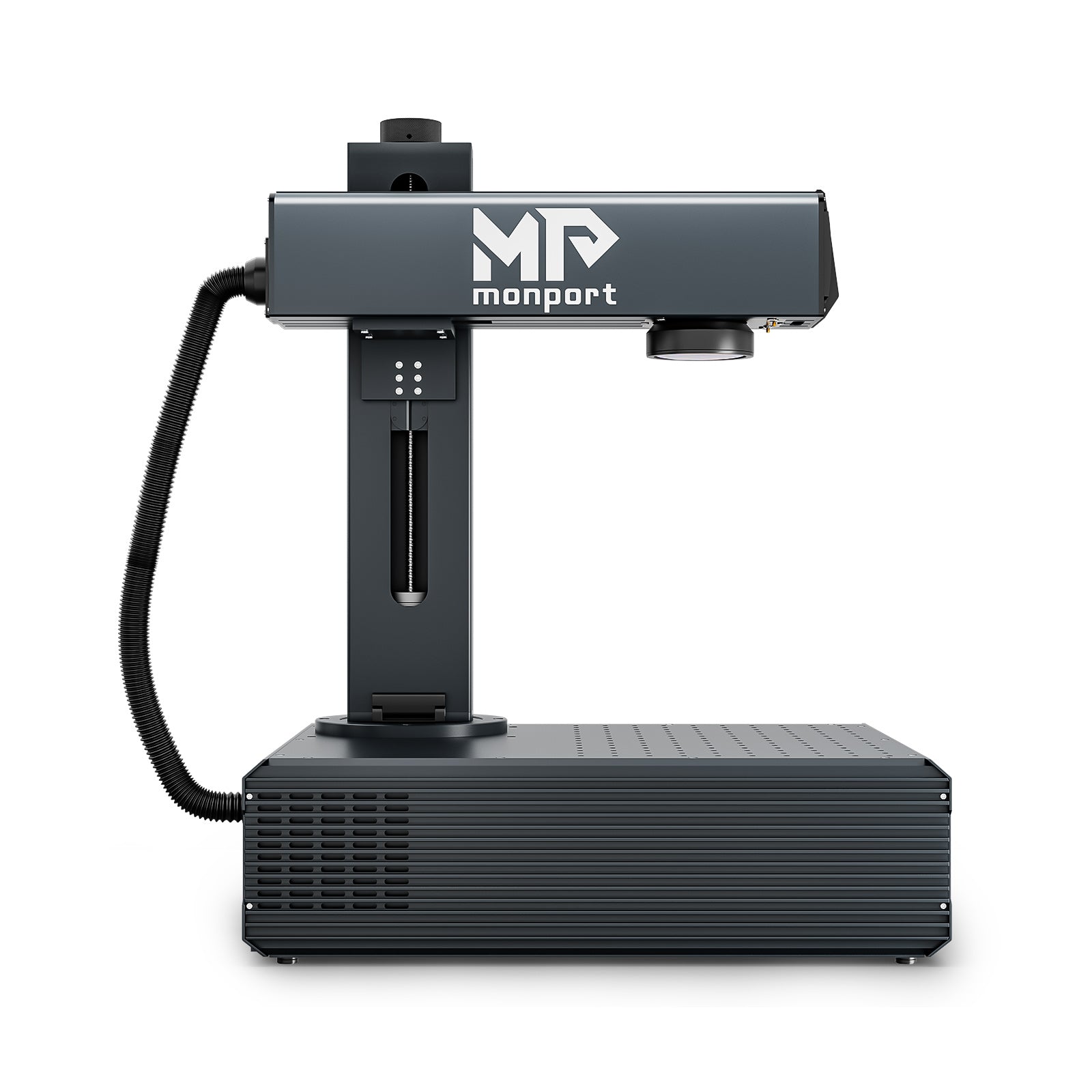
Monport GA 100W : Upgraded Integrated MOPA Fiber Laser Engraver & Marking Machine with Auto Focus

Understanding Why Metal Engravings Look Light
Before discussing how to darken laser engraving on metal, it's important to understand why engravings sometimes appear faint.
Several factors affect engraving darkness:
-
Laser power
-
Frequency settings
-
Pulse width
-
Marking speed
-
Focus accuracy
-
Metal type
-
Surface condition
Even a powerful laser engraver machine for metal can produce poor results if the settings are not optimised.
For example, stainless steel responds differently than aluminium. Titanium behaves differently again. Learning how to darken laser engraving on metal requires understanding how each material reacts to laser energy.
Choose the Right Laser Engraver Machine for Metal
The biggest factor in achieving dark and clear engravings is selecting a professional-grade laser engraver machine for metal.
Many entry-level systems can mark metal, but they often lack the control needed for high-contrast results. Professional users usually prefer MOPA fibre laser technology because it offers extensive control over pulse width and frequency.
One excellent example is the Monport GA 100W MOPA Fiber Laser Engraver.
Why the Monport GA 100W Stands Out
The Monport GA 100W is a premium laser engraver machine for metal designed for industrial and professional applications.
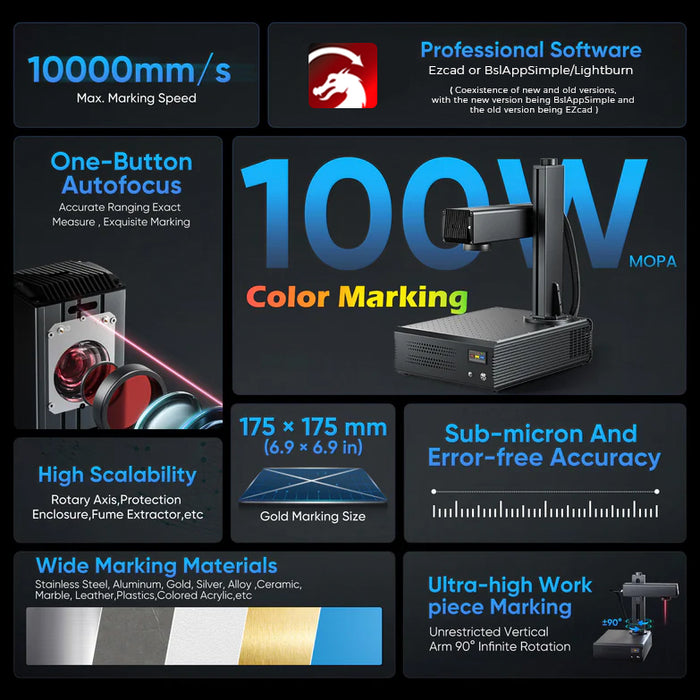
Key specifications include:
-
100W laser power
-
1064nm wavelength
-
6.9" × 6.9" working area
-
Marking speed up to 10,000 mm/s
-
Auto-focus technology
-
MOPA laser source
-
100,000-hour expected service life
-
0.01mm precision spot size
For businesses focused on how to darken laser engraving on metal, the machine's adjustable pulse width and frequency controls provide a huge advantage.
The frequency range of 1-3000kHz and pulse width range of 2-500ns allow users to fine-tune the engraving process for darker and clearer results.
Clean the Metal Surface Before Engraving

One of the simplest answers to how to darken laser engraving on metal is proper surface preparation.
Dirt, oil, fingerprints, and oxidation can interfere with laser energy.
Before engraving:
-
Wipe the surface with isopropyl alcohol.
-
Remove dust and debris.
-
Ensure the metal is completely dry.
-
Avoid touching cleaned surfaces.
Even the best laser engraver machine for metal performs better when working on a clean material.
Perfect Your Focus Settings

Focus accuracy directly affects engraving darkness.
If the laser beam is slightly out of focus, energy becomes dispersed, resulting in lighter markings.
This is where the Monport GA 100W provides a major benefit.
Auto-Focus Technology
The Monport system features proprietary auto-focus technology with accuracy better than ±1mm.
Instead of spending time manually adjusting focus, users can achieve precise settings with a single click.
For anyone researching how to darken laser engraving on metal, accurate focus is one of the quickest ways to improve results.
The auto-focus capability also helps maintain consistency across production runs using a professional laser engraver machine for metal.
Adjust Speed and Power Properly

Laser speed and power work together.
Many beginners assume maximum speed saves time, but this often creates lighter marks.
To improve darkness:
-
Increase power gradually.
-
Reduce marking speed.
-
Test multiple combinations.
-
Avoid excessive heat buildup.
When learning how to darken laser engraving on metal, slower speeds usually allow more laser energy to interact with the surface.
A quality laser engraver machine for metal provides enough power flexibility to balance speed and darkness effectively.
Use MOPA Settings for Dark Black Marking

MOPA technology offers one of the best solutions for how to darken laser engraving on metal.
Unlike traditional fibre lasers, MOPA systems allow users to control:
-
Frequency
-
Pulse width
-
Energy delivery
This additional control helps create oxidation layers that appear much darker.
Stainless Steel Black Marking
One of the biggest advantages of the Monport GA 100W is its ability to produce deep black markings on stainless steel.
Users searching for how to darken laser engraving on metal often discover that black marking is achieved through oxidation rather than deep engraving.
The machine's adjustable settings make this process much easier.
This capability makes the Monport an exceptional laser engraver machine for metal for branding, serial numbers, QR codes, and industrial identification.
Experiment with Multiple Passes
Sometimes a single pass is not enough.
Multiple passes can increase contrast while maintaining detail.
Benefits include:
-
Darker markings
-
Better readability
-
Improved consistency
-
Enhanced logo visibility
When exploring how to darken laser engraving on metal, testing two or three lighter passes may produce better results than one aggressive pass.
Most professional operators using a laser engraver machine for metal regularly perform test grids before production.
Looking for a professional solution for dark metal marking?
The Monport GA 100W MOPA Fibre Laser delivers industrial-grade precision, auto-focus technology, colour marking capability, and exceptional engraving quality. Whether you're creating serial numbers, custom products, or industrial parts, this advanced laser engraver machine for metal offers the flexibility needed to master how to darken laser engraving on metal.
Discover More and explore the Monport GA 100W today. Don't forget to use blog code AUBLOG888 for exclusive savings.
Take Advantage of Adjustable Frequency and Pulse Width
Professional engravers know that pulse width and frequency settings are critical.
The Monport GA 100W offers:
-
Frequency range: 1-3000kHz
-
Pulse width range: 2-500ns
These adjustments significantly influence engraving colour, darkness, and texture.
When studying how to darken laser engraving on metal, this level of control becomes extremely valuable.
Many lower-end machines simply cannot match the flexibility offered by a MOPA-based laser engraver machine for metal.
Consider Material Type

Not all metals respond equally.
Stainless Steel
Excellent for dark and black marking.
Titanium
Can produce vivid colours and dark contrasts.
Anodised Aluminium
Produces sharp black marks with excellent visibility.
Brass and Copper
Require more testing due to their reflective properties.
Understanding material behaviour is another essential step in learning how to darken laser engraving on metal.
The versatility of a MOPA-based laser engraver machine for metal helps users adapt to different materials efficiently.
Why Australian Businesses Choose Monport
Australian manufacturers, workshops, jewellery makers, and custom engraving businesses need equipment that combines power with reliability.
The Monport GA 100W offers:
-
One-minute installation
-
LightBurn compatibility
-
Integrated aluminium body
-
Industrial-grade stability
-
Auto-focus innovation
-
180° adjustable operation
-
Colour marking capabilities
-
Precision cutting and drilling support
For businesses serious about how to darken laser engraving on metal, Monport delivers the tools needed to achieve professional results.
The machine's integrated design also reduces setup complexity compared to many competing systems.
Key Takeaways
-
A quality laser engraver machine for metal is essential for achieving dark and clear engravings.
-
Understanding how to darken laser engraving on metal involves proper focus, power, speed, frequency, and pulse width settings.
-
Clean metal surfaces always improve engraving quality.
-
MOPA fibre lasers provide superior control compared to standard fibre lasers.
-
Multiple passes can often create darker results.
-
The Monport GA 100W offers advanced MOPA technology, auto-focus, and industrial-grade performance.
-
Testing settings on each material is the fastest way to optimise engraving quality.
FAQs
1. What is the best way to darken laser engraving on metal?
The best approach is adjusting laser frequency, pulse width, power, and speed while ensuring accurate focus. MOPA fibre lasers provide the most control for dark markings.
2. Which metal produces the darkest laser engravings?
Stainless steel is typically the easiest metal for producing dark and black laser markings.
3. Why is a MOPA laser better for metal engraving?
MOPA lasers allow users to adjust pulse width and frequency independently, giving greater control over colour, darkness, and surface finish.
4. Can the Monport GA 100W create black markings on stainless steel?
Yes. Its MOPA technology and adjustable settings make it highly effective for producing deep black markings on stainless steel.
5. Is auto-focus important for metal engraving?
Absolutely. Proper focus improves energy concentration, resulting in darker, sharper, and more consistent engravings.
Conclusion
Achieving darker and clearer metal engravings isn't about using random settings. Success comes from understanding material behaviour, optimising machine parameters, and investing in the right equipment.
If you're serious about mastering how to darken laser engraving on metal, choosing a professional laser engraver machine for metal like the Monport GA 100W can dramatically improve your results. Its powerful MOPA technology, adjustable pulse width and frequency controls, integrated auto-focus system, and industrial-grade construction make it a standout choice for professionals across Australia.
Whether you're producing industrial markings, custom products, jewellery engravings, or branded components, the right machine and settings can turn average marks into sharp, dark, and highly visible engravings.
Shop Now and upgrade your engraving workflow with Monport's advanced laser solutions. Remember to use blog code AUBLOG888 for exclusive discounts.


Leave a comment