



 GPro 100W
 GA 100W
 GA 60W
 GM Pro 60W
 Reno 65W
 Reno 65W Pro

Beginner's Laser Engraving Setup: Choosing a Laser Engraver for Beginners and the Best Laptop for Laser Engraving
8%
off
Hurry! Offer Ends Soon!
CODE: AUBLOG888
COPY
CODE
CODE
Getting started with laser engraving is exciting, but it can also feel a bit overwhelming when you're looking at all the machine and computer options available today. Many people jump into the hobby or business side of engraving without knowing what equipment they actually need.
The two most important things to consider are finding the right laser engraver for beginners and selecting the best laptop for laser engraving. These two choices will directly affect your learning experience, engraving quality, workflow speed, and overall success.
Whether you're planning to create custom metal tags, jewellery, personalised gifts, signage, or even launch a small engraving business, choosing the correct equipment from the start can save time, money, and frustration.
In this guide, we'll cover everything you need to know about selecting a laser engraver for beginners, how to identify the best laptop for laser engraving, and why Monport machines have become a popular choice among new and experienced engravers alike.
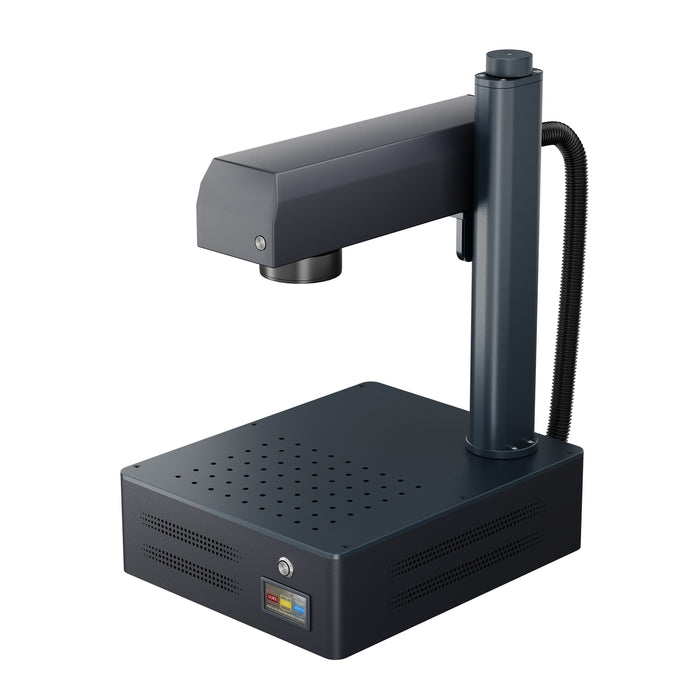
Monport GM 30W Pro Integrated JPT MOPA Fiber Laser Engraver & Marking Machine with AutoFocus

Why Beginners Need the Right Setup
Many first-time users focus only on the machine itself. While the engraver is important, the computer running your software is equally critical.
A good laser engraver for beginners should be easy to operate, reliable, and capable of producing professional results without a steep learning curve.
Likewise, the best laptop for laser engraving should handle design software smoothly, communicate reliably with your machine, and support future upgrades as your projects become more advanced.
Starting with the right setup allows you to:
-
Learn faster
-
Reduce mistakes
-
Produce cleaner engravings
-
Improve workflow efficiency
-
Grow into more advanced projects
How to Choose a Laser Engraver for Beginners

Focus on Ease of Use
When looking for a laser engraver for beginners, simplicity matters.
Features like autofocus, user-friendly software, and stable machine construction can significantly shorten the learning process.
Instead of spending hours adjusting settings manually, beginners should focus on learning materials, design preparation, and engraving techniques.
Look for Precision
Accuracy becomes important very quickly.
Even if you're only making small personalised products, poor engraving quality can make projects look unprofessional.
A quality laser engraver for beginners should offer precise positioning and consistent engraving performance across the entire work area.
Consider Material Compatibility
Not all laser machines are designed for the same materials.
If your goal is engraving metals, stainless steel, aluminium, jewellery, tools, or industrial components, you'll want a fibre laser system rather than a standard diode machine.
Choosing the right laser engraver for beginners based on your intended materials prevents expensive upgrades later.
Why the Monport GM 30W Pro Is an Excellent Choice
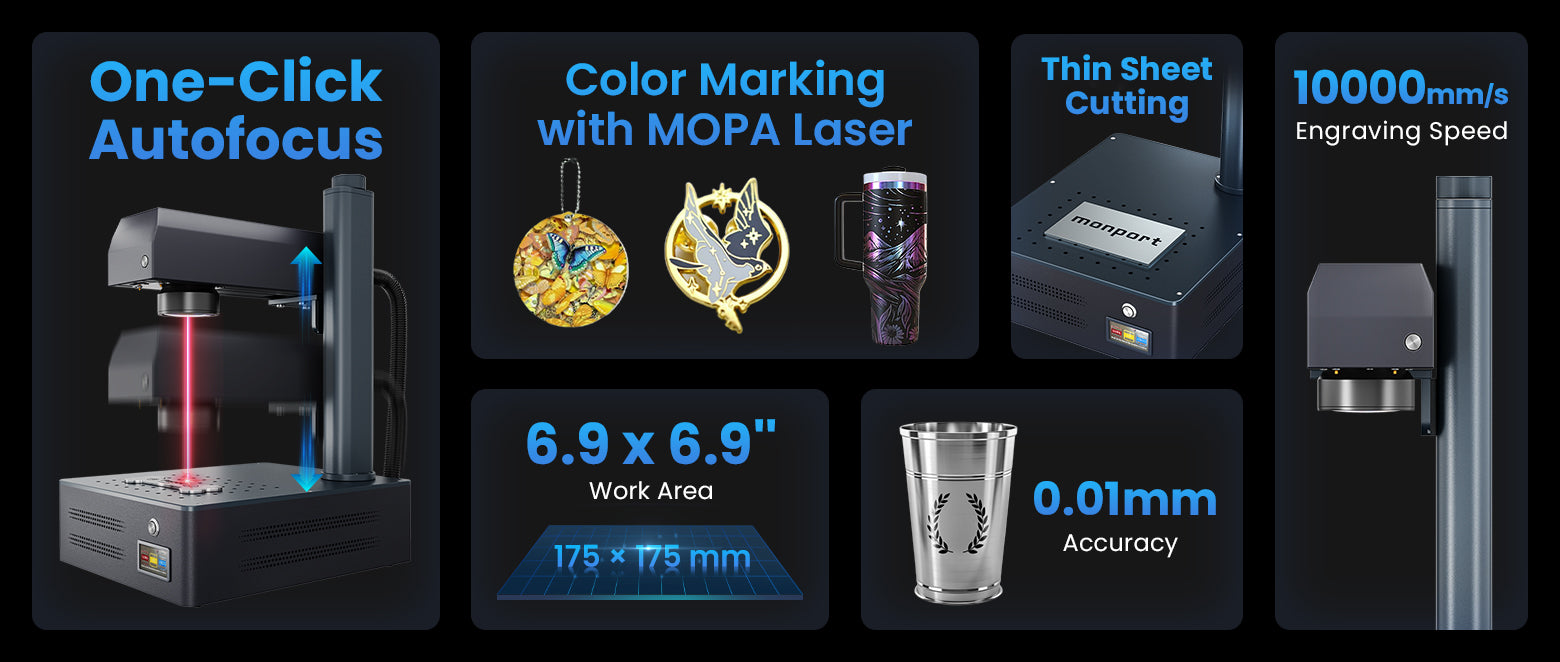
For beginners who want professional results from day one, the Monport GM 30W Pro Integrated JPT MOPA Fiber Laser Engraver stands out.
One-Touch Autofocus Makes Learning Easier
One reason many people struggle with a new laser engraver for beginners is focusing the machine correctly.
The Monport GM 30W Pro solves this with its One-Touch Autofocus feature.
Instead of manually adjusting focus every time, users can achieve accurate setup quickly, making the engraving process easier and more consistent.
Exceptional Precision
The machine delivers professional-grade accuracy down to 0.01mm.
For anyone searching for a dependable laser engraver for beginners, this level of precision means cleaner text, sharper logos, and more detailed artwork.
Its custom galvanometer system and advanced field mirror help maintain engraving quality even during high-speed operation.
Fast Engraving Speeds
The Monport GM 30W Pro reaches engraving speeds of up to 10,000mm/s.
This is especially beneficial when production volume increases.
Many users begin with hobby projects and later turn their laser engraver for beginners into a profitable side business. Faster engraving speeds support that growth.
Deep Engraving and 3D Relief Capability
Another major advantage is deep engraving performance.
The 30W MOPA fibre laser allows users to create detailed markings, deep engravings, and impressive 3D relief designs.
This gives a laser engraver for beginners the flexibility to explore both simple and advanced applications without immediately needing a more powerful machine.
Ideal Working Area
The machine features a precisely tuned 175 x 175mm engraving area.
This size is ideal for most beginner and small-business projects while maintaining consistent power across the entire workspace.
If you're ready to invest in a professional-grade laser engraver for beginners, Monport offers powerful solutions designed to help new users succeed faster. Discover More about the Monport GM 30W Pro and use blog code AUBLOG888 for exclusive savings.
Choosing the Best Laptop for Laser Engraving

A machine is only half of the setup.
The best laptop for laser engraving ensures smooth communication between your software and engraver.
Processor Requirements
The best laptop for laser engraving should include at least:
-
Intel Core i5 or AMD Ryzen 5
-
16GB RAM preferred
-
SSD storage
-
Dedicated graphics optional but helpful
Laser software doesn't usually require gaming-level performance, but a modern processor improves responsiveness.
RAM Matters
The best laptop for laser engraving should have enough memory to handle large design files.
Complex vector graphics, photo engraving projects, and multiple applications running simultaneously benefit greatly from 16GB RAM.
SSD Storage Is Essential
An SSD dramatically improves software loading times.
The best laptop for laser engraving should ideally include at least a 512GB SSD, especially if you store design libraries and project files locally.
Operating System Compatibility
Before buying a computer, verify compatibility.
The Monport GM 30W Pro supports both Windows and macOS systems.
This flexibility makes it easier to choose the best laptop for laser engraving based on your personal preference.
Recommended Laptop Features for Beginners
When evaluating the best laptop for laser engraving, prioritise:
-
Reliable USB connectivity
-
Modern processor
-
Minimum 16GB RAM
-
SSD storage
-
Full HD display
-
Good battery life
-
Stable operating system
A balanced machine will serve you better than spending heavily on unnecessary gaming features.
Common Beginner Mistakes to Avoid
Many new users purchase the wrong equipment because they focus solely on price.
Avoid these mistakes:
-
Buying an underpowered computer instead of the best laptop for laser engraving
-
Selecting the wrong laser type
-
Ignoring software compatibility
-
Choosing machines with limited support
-
Overlooking future business growth
The right laser engraver for beginners should be able to grow alongside your skills.
Building a Future-Proof Engraving Setup

The ideal setup combines a reliable laser engraver for beginners with the best laptop for laser engraving.
This combination allows you to:
-
Learn efficiently
-
Produce professional-quality work
-
Handle more complex projects
-
Expand into commercial applications
-
Generate additional income opportunities
Many successful engraving businesses started with a beginner-friendly setup and gradually expanded their capabilities over time.
Key Takeaways
-
Choosing the right laser engraver for beginners is critical for long-term success.
-
The best laptop for laser engraving improves workflow and software performance.
-
Monport's GM 30W Pro offers autofocus, 0.01mm accuracy, and 10,000mm/s engraving speed.
-
Fibre laser technology is ideal for metal and aluminium engraving.
-
A laptop with 16GB RAM and SSD storage is recommended.
-
Proper equipment helps beginners learn faster and achieve professional results.
Conclusion
Starting your engraving journey becomes much easier when you invest in the right equipment from the beginning. A dependable laser engraver for beginners helps reduce the learning curve, while the best laptop for laser engraving ensures smooth operation and efficient project management.
The Monport GM 30W Pro stands out as an excellent solution thanks to its One-Touch Autofocus, professional 0.01mm precision, powerful 30W MOPA fibre laser technology, and impressive engraving speed. Whether you're creating personalised gifts, industrial markings, jewellery, or custom metal products, this machine provides the flexibility and performance needed to grow your skills.
If you're serious about achieving high-quality engraving results, combining a professional laser engraver for beginners with the best laptop for laser engraving creates a foundation that can support both hobby projects and future business opportunities.
Shop Now and explore Monport's engraving solutions today. Don't forget to use blog code AUBLOG888 for exclusive discounts and added value on your purchase.
Use blog code AUBLOG888 for exclusive discounts on eligible Monport laser engraving machines and accessories.
FAQs
1. What is the best laser engraver for beginners?
A fibre laser like the Monport GM 30W Pro is an excellent option for beginners interested in metal engraving because it combines ease of use, autofocus functionality, and professional-grade precision.
2. What is the best laptop for laser engraving?
The best laptop for laser engraving typically includes a modern Intel Core i5 or Ryzen 5 processor, 16GB RAM, SSD storage, and compatibility with your engraving software.
3. Can beginners use a fibre laser engraver?
Yes. Modern fibre laser systems such as the Monport GM 30W Pro include beginner-friendly features that simplify setup and operation.
4. Does laser engraving require a powerful computer?
Not necessarily. However, the best laptop for laser engraving should have sufficient RAM and SSD storage to ensure smooth software performance.
5. Can the Monport GM 30W Pro engrave aluminium?
Yes. The Monport GM 30W Pro is designed for metal applications and can engrave aluminium, stainless steel, brass, titanium, and many other metals effectively.


Leave a comment