



 GPro 100W
 GA 100W
 GA 60W
 GM Pro 60W
 GM Pro 30W
 Reno 65W
 Reno 65W Pro

Reno 45 Pro vs Reno 65 Pro: The Ultimate Desktop CO2 Laser Engraver Comparison
8%
off
Hurry! Offer Ends Soon!
CODE: AUBLOG888
COPY
CODE
CODE
If you're planning to buy a desktop CO2 laser engraver, chances are you've already come across the reno 45 pro vs reno 65 pro debate. Both machines come from Monport's latest Reno series and are built for makers, small business owners, schools, hobbyists, and anyone who wants professional engraving and cutting without needing a large industrial machine.
Choosing between the two isn't only about laser power. Your budget, available workspace, the materials you use, and the types of projects you want to create all play a part. Some users mainly engrave timber signs and acrylic gifts, while others regularly cut thicker materials for production work. That's why understanding the real differences matters.
In this guide, we'll compare the reno 45 pro vs reno 65 pro in practical terms. We'll look at cutting performance, engraving speed, working area, camera features, autofocus, software compatibility, and the kinds of projects each machine handles best. By the end, you'll have a much clearer idea of which desktop CO2 laser engraver is the better fit for your workshop.
|
|
|

Why Compare the Reno 45 Pro and Reno 65 Pro?
At first glance, these two machines share many premium features. Both are designed by Monport, both use magnetic assisted focus, and both support popular software like LightBurn. They also include thoughtful upgrades that make everyday engraving easier than many traditional desktop laser machines.
However, the differences become more obvious once you start working on real projects.
The reno 45 pro vs reno 65 pro comparison comes down to several important factors:
-
Laser power
-
Working area
-
Maximum engraving speed
-
Material thickness
-
Production efficiency
-
Business scalability
-
Overall value for your budget
If you're upgrading from a K40 laser, both models represent a huge improvement. The question is whether you need the extra capability offered by the larger machine or whether the smaller model already does everything you need.
Monport Reno 45 Pro Overview
For many makers, the Reno 45 Pro is the sweet spot between affordability and professional performance. It offers features that were once found only on much more expensive laser systems while keeping a compact footprint that's easy to fit into a home workshop or small business.
Compact but Surprisingly Powerful
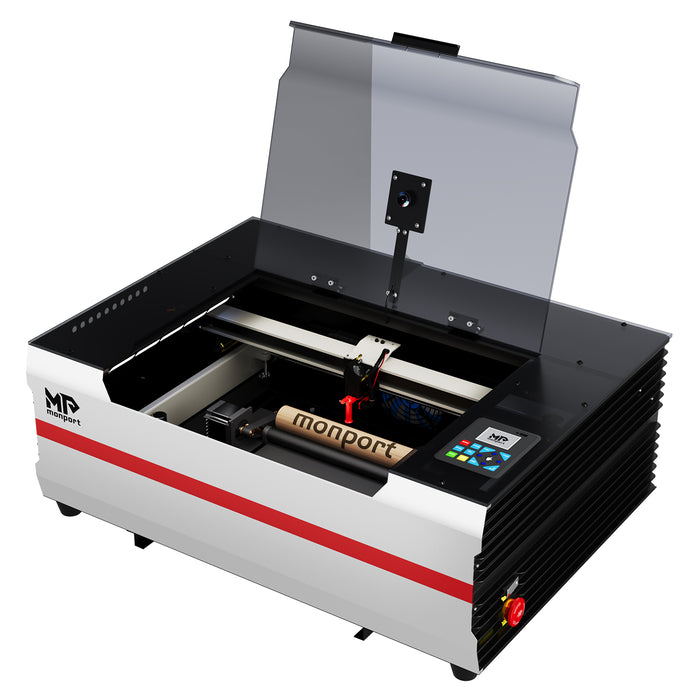
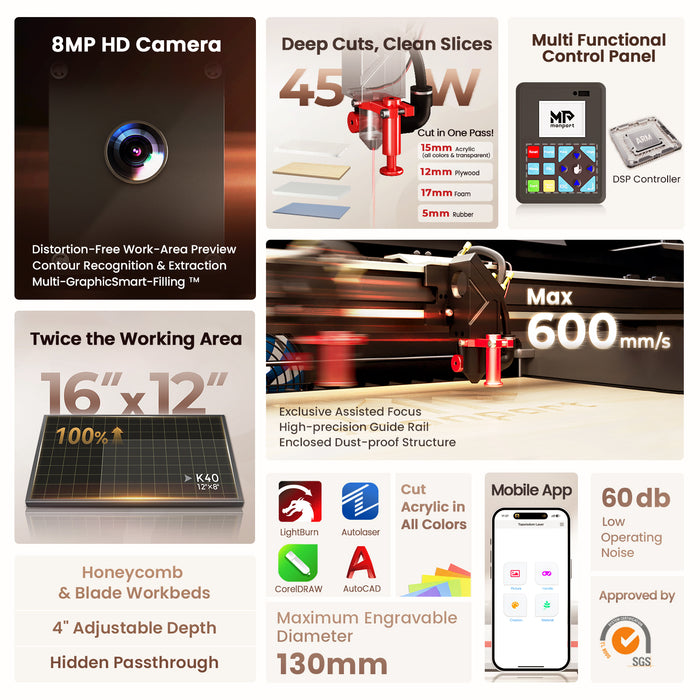
The Reno 45 Pro features a 45W laser with a 400 × 300 mm (16 × 12 inch) working area. While compact, it delivers cutting performance that is several times stronger than a traditional K40 machine.
Monport also designed its own laser tube together with premium reflective mirrors and focusing lenses. That means cleaner cuts, sharper engraving, and more consistent results across different materials.
The machine can cut acrylic up to 15 mm thick, making it suitable for:
-
Personalised gifts
-
Timber signs
-
Acrylic keyrings
-
Wedding decorations
-
Home décor
-
School projects
-
Leather goods
-
Small business products
For many users looking for a desktop CO2 laser engraver, this capacity is already more than enough.
Smart Camera Makes Every Job Easier
One of the biggest highlights during the reno 45 pro vs reno 65 pro comparison is that the Reno 45 Pro already includes advanced vision technology.
Its built-in 8MP HD camera provides a distortion-free preview of the work area, helping users position designs accurately before engraving begins.
Instead of guessing where artwork will land, you can preview everything directly inside the software.
The camera also supports:
-
Automatic contour recognition
-
Precise material positioning
-
Scrap material reuse
-
Batch production
-
Pattern extraction
-
Faster setup
This is especially valuable for businesses producing personalised products where alignment must be accurate every time.
World's First Multi-Graphic Smart Filling Technology
Monport introduced one of the most interesting innovations in the Reno series.
The camera scans materials in around three seconds and automatically fills multiple objects with preset designs.
Imagine placing several different-shaped wooden ornaments onto the workbed. Instead of positioning each one manually, the machine detects them, recognises their outlines, and fills them automatically.
For anyone producing batches of custom products, this can save a significant amount of time every week.
Built for Beginners and Professionals
The Reno 45 Pro also features Monport's exclusive magnetic assisted focus.
Unlike manual focusing systems that often require multiple adjustments, this design lets users achieve accurate focus within seconds.
Whether you've owned several lasers or this is your very first desktop CO2 laser engraver, the process feels quick and straightforward.
Combined with LightBurn compatibility, Autolaser software, and support for CorelDRAW, Illustrator, AutoCAD, and Inkscape imports, the Reno 45 Pro gives users plenty of flexibility.
Monport Reno 65 Pro Overview
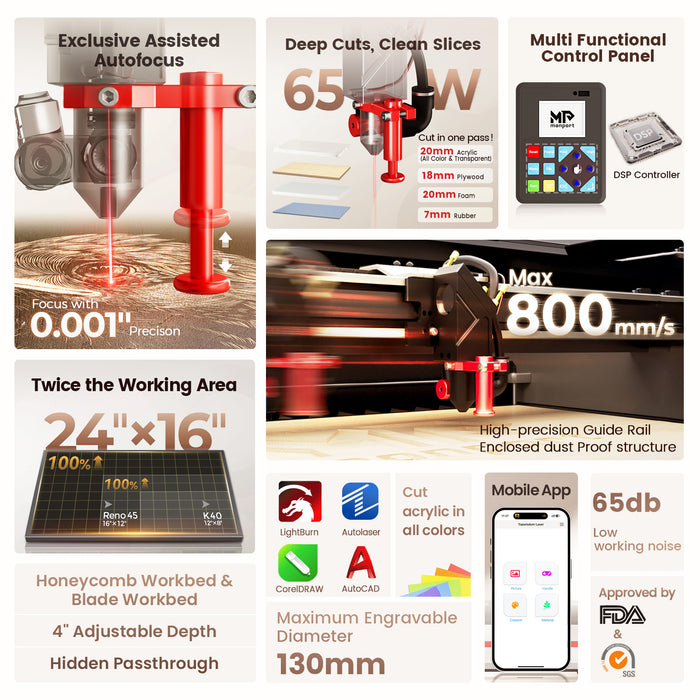
If your workload is growing, or you simply want more production capacity from day one, the Reno 65 Pro steps things up in nearly every category.
During any honest reno 45 pro vs reno 65 pro comparison, the Reno 65 Pro stands out because it isn't just a more powerful version of the smaller model. It's designed for users who regularly complete larger jobs and higher production volumes while still keeping the convenience of a desktop CO2 laser engraver.
Bigger Workspace for Bigger Ideas
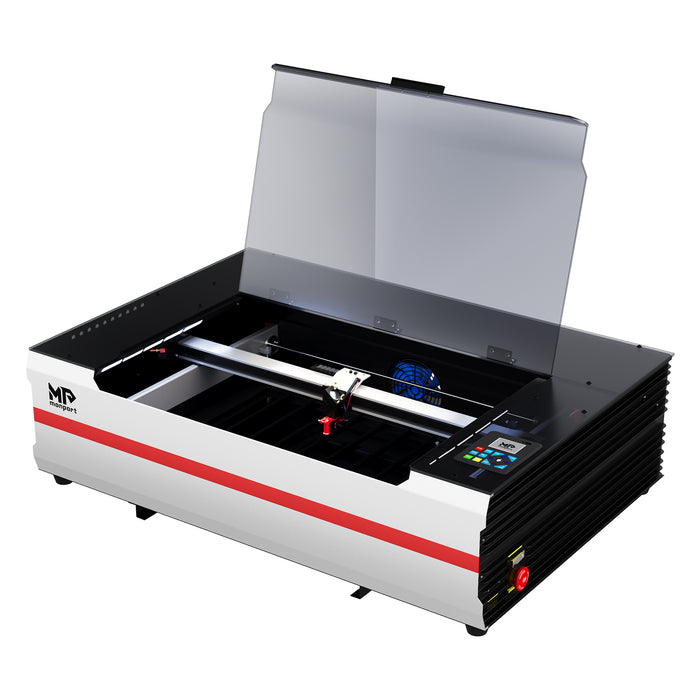
The first difference you'll notice is the generous 600 × 400 mm (24 × 16 inch) work area.
Compared with the Reno 45 Pro, that's roughly twice the engraving space, allowing you to complete larger projects without splitting designs into multiple jobs.
This larger bed is ideal for creating:
-
Large wall signs
-
Business branding
-
Furniture decorations
-
Bulk acrylic products
-
School and commercial signage
-
Multiple personalised gifts in one run
The machine also includes a hidden front pass-through, making it easier to process longer materials when needed.
More Power Means More Possibilities
The Reno 65 Pro increases laser output to 65W, giving it noticeably stronger cutting performance.
With Monport's upgraded optical system, the machine can cut acrylic up to 20 mm thick while maintaining clean edges and reliable accuracy.
For businesses producing thicker products every day, the extra power reduces processing time and expands the range of materials that can be handled confidently.
Faster Production Speeds
Another major difference in the reno 45 pro vs reno 65 pro comparison is engraving speed.
The Reno 65 Pro reaches speeds of up to 800 mm/s thanks to Monport's redesigned motion system, lightweight mechanical structure, customised motors, and precision guide rails.
When you're running dozens of customer orders each week, those faster cycle times can make a real difference to overall productivity.
Discover More about the Monport Reno series and choose the model that matches your workshop today. Whether you're starting a creative side business or expanding production, investing in the right desktop CO2 laser engraver now can save time and unlock more project opportunities. Don't forget to use the exclusive blog code AUBLOG888 at checkout for extra savings.
Reno 45 Pro vs Reno 65 Pro: Feature-by-Feature Comparison

When comparing the reno 45 pro vs reno 65 pro, it helps to look beyond the specifications. Both machines deliver professional results, but they're built for slightly different users. One focuses on compact convenience, while the other is designed for higher output and bigger jobs.
Laser Power and Cutting Performance
Laser power is one of the biggest differences between these two machines.
The Reno 45 Pro uses a 45W laser tube that comfortably handles everyday engraving and cutting tasks. It cuts acrylic up to 15 mm thick and delivers crisp engraving on timber, leather, glass, coated metals, rubber, paper, cardboard, and many other materials.
The Reno 65 Pro increases output to 65W. That extra power isn't only about cutting thicker materials—it also helps complete demanding jobs faster. The machine can cut acrylic up to 20 mm thick while maintaining clean edges and reliable accuracy.
If your business regularly produces thicker signage, display pieces, or structural acrylic parts, the additional power becomes a real advantage.
For many hobbyists and small businesses, however, the Reno 45 Pro already offers more than enough capability.
Working Area
Workspace often determines what kinds of products you can make.
The Reno 45 Pro offers a 400 × 300 mm engraving area, making it ideal for smaller personalised items.
Popular projects include:
- Wedding signs
- Cake toppers
- Wooden ornaments
- Acrylic keyrings
- Name plaques
- Leather wallets
- Drink coasters
- Custom gifts
The Reno 65 Pro expands the working area to 600 × 400 mm, allowing larger projects and higher production capacity.
That extra room makes it easier to engrave:
- Large shop signage
- Home décor panels
- Bulk production runs
- Furniture pieces
- Educational displays
- Multiple products in one job
During any reno 45 pro vs reno 65 pro comparison, this larger work area is often the deciding factor for businesses expecting to grow.
Engraving Speed
Time matters when customer orders start piling up.
The Reno 45 Pro reaches engraving speeds of up to 600 mm/s. That's already extremely fast compared with many desktop laser machines available today.
The Reno 65 Pro pushes performance further with speeds up to 800 mm/s.
Thanks to Monport's redesigned motion system, customised motors, lightweight construction, and precision guide rails, both machines remain stable even while operating at high speeds.
For occasional projects, you may not notice a major difference.
For production environments running every day, those extra millimetres per second quickly add up.
Camera Technology and Smart Positioning
One reason Monport stands out in the laser market is its practical innovation.
Both machines include advanced camera technology that removes much of the trial and error normally associated with laser engraving.
Features available include:
- Distortion-free work area preview
- Accurate material positioning
- Automatic contour recognition
- Outline extraction
- Batch processing
- Scrap material reuse
- Template saving for repeat jobs
Instead of measuring every piece manually, users can position materials naturally and allow the camera to do much of the alignment work.
This saves materials, reduces mistakes, and speeds up production.
Whether you're comparing the reno 45 pro vs reno 65 pro for hobby use or commercial work, both machines offer impressive workflow improvements.
Magnetic Assisted Focus
Manual laser focusing can be frustrating, especially for beginners.
Monport solved this by developing its exclusive Magnetic Assisted Focus system.
Instead of complicated adjustments, users simply follow the magnetic positioning method to achieve proper focus in just a few seconds.
This feature makes both machines approachable for first-time users while still delivering the precision experienced makers expect.
It's one of those small improvements that saves time every single day.
Adjustable Air Assist
Different materials require different airflow.
Too much air can affect engraving quality, while too little may reduce cutting performance.
Unlike many entry-level laser machines with fixed airflow, Monport allows adjustable air assist.
This gives users better control when switching between:
- Timber engraving
- Acrylic cutting
- Leather projects
- Cardboard
- Rubber stamps
- Paper crafts
Being able to fine-tune airflow helps produce cleaner edges, reduce yellowing, and improve overall results.
Software Compatibility and Ease of Use
Buying a desktop CO2 laser engraver shouldn't mean spending weeks learning complicated software.
Fortunately, both Reno models are designed to get users creating quickly.
The Reno 45 Pro supports:
- LightBurn
- Autolaser
- TopwisdomLaser
- CorelDRAW imports
- Illustrator imports
- AutoCAD imports
- Inkscape imports
The Reno 65 Pro supports all of those while adding even more flexibility.
It works with:
- Windows
- macOS
- Linux
- Android
- iOS
The Reno 65 Pro also includes an LCD control panel that allows users to preview jobs, adjust settings, control movement, pause projects, and manage machine functions directly without relying entirely on a computer.
WiFi connectivity, USB transfer, and mobile app support make operation even more convenient.
These additions are another reason the reno 45 pro vs reno 65 pro comparison often favours the larger machine for busy workshops.
Which Projects Suit Each Machine?
The Reno 45 Pro is an excellent choice if your projects focus on personalised products, craft markets, online shops, and custom gifts.
It performs exceptionally well for:
- Christmas ornaments
- Wedding decorations
- Pet tags
- Home décor
- Jewellery boxes
- Personalised drinkware
- School projects
- Small business branding
The Reno 65 Pro suits businesses producing larger products or higher order volumes.
It's ideal for:
- Shop signage
- Restaurant menus
- Large acrylic displays
- Interior decorations
- Furniture engraving
- Commercial branding
- Educational equipment
- Batch manufacturing
Both machines deliver professional-quality engraving, so your choice depends more on project size and production goals than engraving quality alone.
Shop Now and choose the Monport Reno model that matches your workshop, budget, and future plans. Whether you decide on the Reno 45 Pro or upgrade to the Reno 65 Pro, don't forget to use the exclusive discount code AUBLOG888 to enjoy extra savings on your purchase.
Which Machine Should You Choose?

After comparing the reno 45 pro vs reno 65 pro, the right choice really depends on how you plan to use your machine.
If you're starting a creative business, upgrading from a K40, or mainly producing personalised products, the Reno 45 Pro offers outstanding value. It delivers professional engraving quality, reliable cutting performance, advanced camera positioning, and Monport's exclusive Magnetic Assisted Focus in a compact package. For many makers, this desktop CO2 laser engraver has more than enough capability for everyday work.
On the other hand, if your business is growing or you already process customer orders every day, the Reno 65 Pro gives you more room to expand. The larger work area, faster engraving speed, stronger 65W laser, adjustable air assist, LCD control panel, WiFi connectivity, and improved production efficiency make it a smart long-term investment.
Looking at the reno 45 pro vs reno 65 pro, neither machine is simply "better." They are designed for different stages of a maker's journey.
Choose the Reno 45 Pro if you want:
- A compact machine that fits smaller workshops
- Excellent value for money
- Professional engraving and cutting
- Advanced camera alignment
- Fast setup with magnetic assisted focus
- A dependable desktop CO2 laser engraver for custom products
Choose the Reno 65 Pro if you want:
- A larger 600 × 400 mm work area
- Faster production at up to 800 mm/s
- Stronger 65W cutting performance
- The ability to cut thicker acrylic
- LCD controls and WiFi connectivity
- A desktop CO2 laser engraver ready for higher production volumes
Whichever model you choose, Monport has shown that desktop laser machines no longer need to compromise on speed, precision, or ease of use.
Key Takeaways
- The reno 45 pro vs reno 65 pro comparison comes down to workspace, laser power, production speed, and future business needs.
- Both machines feature Monport's exclusive Magnetic Assisted Focus for quick and accurate setup.
- The Reno 45 Pro includes an 8MP HD camera with distortion-free preview, contour recognition, and Multi-Graphic Smart Filling Technology.
- The Reno 65 Pro offers a larger engraving area, higher engraving speed, and a more powerful 65W laser for demanding projects.
- Both models are compatible with LightBurn and other popular software, making them beginner-friendly while still meeting professional expectations.
- Whether you're creating personalised gifts or commercial signage, both machines deliver the performance expected from a premium desktop CO2 laser engraver.
Conclusion
The reno 45 pro vs reno 65 pro discussion isn't about finding a winner. It's about finding the machine that matches your workflow today while supporting your plans for tomorrow.
The Reno 45 Pro is an excellent choice for hobbyists, educators, and small businesses looking for professional features in a compact machine. Its smart camera system, fast engraving speed, and reliable cutting ability make it an outstanding all-round desktop CO2 laser engraver.
The Reno 65 Pro takes everything further. With more power, a larger working area, faster operation, and features designed for higher productivity, it's ideal for businesses ready to increase output without moving to a bulky industrial system.
Monport continues to raise the standard by combining practical innovation with user-friendly operation. Instead of adding unnecessary complexity, the Reno series focuses on features that genuinely save time, improve accuracy, and help users produce better results. Whether you're making one personalised gift or hundreds of products each week, there's a Reno machine built to support your success.
Discover More about the Monport Reno series today and choose the desktop CO2 laser engraver that best fits your creative goals or business needs. Don't forget to apply AUBLOG888 before completing your order to unlock your exclusive discount.

Leave a comment