



 GPro 100W
 GA 100W
 GA 60W
 GM Pro 60W
 GM Pro 30W
 Reno 65W
 Reno 65W Pro

Fiber Laser Engraver Buying Guide: Everything to Know Before You Buy
8%
off
Hurry! Offer Ends Soon!
CODE: AUBLOG888
COPY
CODE
CODE
Buying a fibre laser engraver is a significant investment, especially if you are setting up a workshop, expanding a customisation business, or adding metal engraving to an existing operation. The machine that looks impressive on a product page is not necessarily the right one for your materials, workspace, budget, or workload.
If you are searching for the best laser engraver for small business, it helps to look beyond wattage and price. A proper fiber laser comparison should consider the laser source, pulse settings, marking area, speed, focusing system, software compatibility, machine footprint, ventilation, and the type of work you actually plan to produce.
This guide walks through those decisions step by step, so you can make a more informed purchase rather than simply choosing the machine with the biggest number.
What Is a Fibre Laser Engraver?
A fibre laser engraver uses a fibre laser source to produce a concentrated beam of light, typically at a wavelength around 1064nm. This makes fibre lasers particularly well suited to marking and engraving metals and certain plastics.
They are commonly used for products such as jewellery, tools, nameplates, industrial components, tumblers, tags, personalised gifts, and machine parts.
Unlike CO₂ laser machines, which are commonly selected for materials such as wood, acrylic, leather and other non-metal materials, fibre lasers are primarily chosen when metal marking and engraving are the priority.
For businesses, the advantage is consistency. Once the settings are dialled in for a particular material, you can reproduce similar results across multiple pieces.
Why Choosing the Right Wattage Matters

Laser wattage is one of the first specifications buyers notice, but it should not be the only one guiding your decision.
Generally, higher wattage gives you more available power for demanding applications such as deeper engraving, faster processing and certain cutting or drilling tasks. Lower-power machines can still be highly capable for surface marking and many everyday personalisation jobs.
30W Fibre Lasers
A 30W fibre laser can be a practical starting point for businesses focused on general engraving and marking.
It is particularly appealing when the workload does not require maximum depth or the fastest possible processing. If you primarily engrave names, logos, serial numbers, graphics and other surface details, 30W may provide a sensible balance between capability and investment.
The Monport GM 30W Pro Integrated JPT MOPA Fibre Laser Engraver & Marking Machine uses a MOPA fibre laser source with a 1064nm wavelength, a 175 × 175mm engraving area and a maximum engraving speed of 10,000mm/s.
60W Fibre Lasers
A 60W machine provides considerably more power for users who want greater engraving depth and more demanding production capabilities.
The Monport GM 60W Pro Integrated JPT MOPA Fibre Laser Engraver & Marking Machine is designed around this higher-power approach. It combines 60W output with MOPA technology, 2–500ns pulse width adjustment and a frequency range of 1–4000kHz.
For a growing business that expects to handle a mixture of detailed marking, deeper engraving and 3D relief work, 60W can be an attractive middle ground.
100W Fibre Lasers
A 100W fibre laser is aimed more towards users who need substantial power and production capability.
The Monport GA 100W Upgraded Integrated MOPA Fibre Laser Engraver & Marking Machine offers 100W laser power, a 6.9 × 6.9-inch working area, a 1064nm wavelength and marking speeds of up to 10,000mm/s.
For heavier production requirements, the additional power can be valuable. However, buying 100W simply because it is the largest option is not automatically the best decision.
MOPA Fibre Laser vs Standard Fibre Laser
One of the more important parts of a fiber laser comparison is the laser source itself.
MOPA stands for Master Oscillator Power Amplifier. In practical terms, MOPA fibre lasers offer greater control over pulse characteristics, which can be useful when working with different metals, colours and marking effects.
For example, MOPA technology can be useful for applications involving stainless-steel colour marking, black marking on anodised aluminium and other specialised effects.
The Monport GM Pro models provide a pulse-width range of 2–500ns and frequency adjustment from 1–4000kHz, giving users more control over how energy is delivered to the material.
This flexibility is one reason MOPA machines can be worth considering if your business plans to offer more than basic black marking.
Comparing Fibre Laser Machines
Here is a straightforward fiber laser comparison of the Monport models discussed in this guide.
| Specification |
|
|
|
|
|---|---|---|---|---|
| Laser power | 30W | 60W | 60W | 100W |
| Laser type | MOPA fibre | MOPA fibre | MOPA fibre | MOPA fibre |
| Wavelength | 1064nm | 1064nm | 1064nm | 1064nm |
| Working/engraving area | 175 × 175mm | 175 × 175mm | 6.9 × 6.9in | 6.9 × 6.9in |
| Maximum marking/engraving speed | 10,000mm/s | 10,000mm/s | 10,000mm/s, up to 15,000mm/s | 10,000mm/s |
| Pulse width | 2–500ns | 2–500ns | 2–500ns | 2–500ns* |
| Frequency | 1–4000kHz | 1–4000kHz | 1–3000kHz* | — |
| Autofocus | One-touch | One-touch | One-click, error <±1mm | One-click, error <±1mm |
| Machine dimensions | 400 × 330 × 620mm | 400 × 330 × 620mm | 420 × 350 × 620mm | 500 × 375 × 650mm |
| Machine weight | 15.6kg | 16.6kg | Not specified in supplied specifications | Not specified in supplied specifications |
| Software | BslAppSimple, LightBurn | BslAppSimple, LightBurn | LightBurn compatible | LightBurn compatible |
| Operating systems | Windows / macOS | Windows / macOS | Not specified | Not specified |
| Expected service life | 100,000 hours | 100,000 hours | 100,000 hours MTTF | 100,000 hours MTTF |
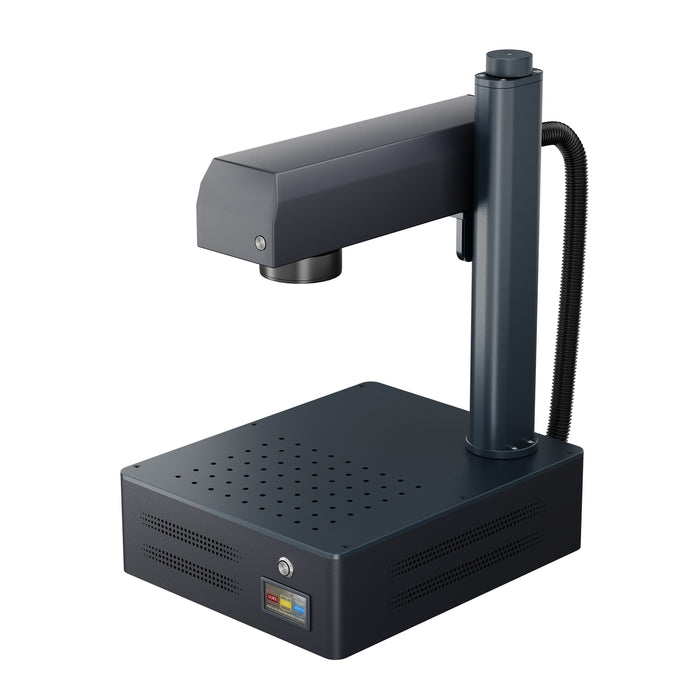
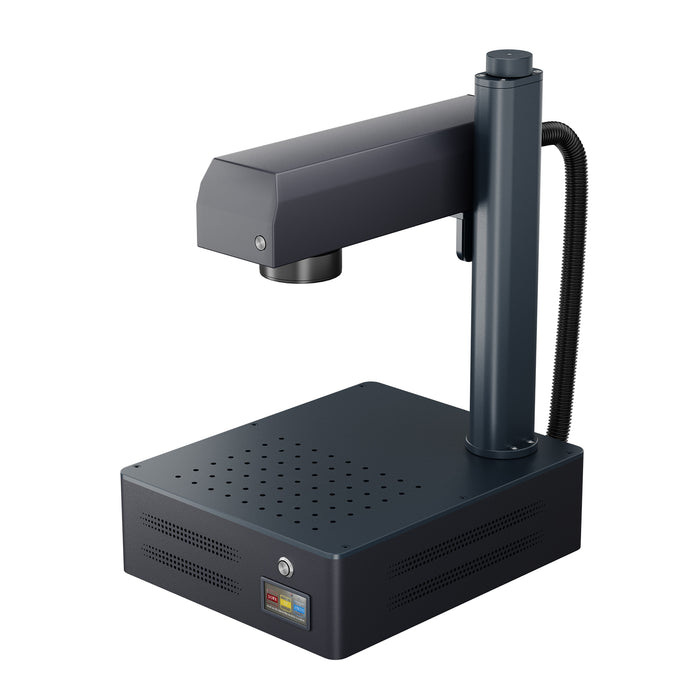


*The supplied GA specifications state a 2–500ns pulse width and 1–3000kHz frequency range for the GA models.
The important takeaway from this fiber laser comparison is that machines with different wattages can share similar working areas and speeds while still offering different levels of available laser power and application flexibility.
Bed Size: Bigger Isn't Always Better
Working area is another specification that deserves careful attention.
A larger bed can be useful when engraving larger products, but it can also increase the machine's footprint and cost. For many personalised products, a compact 175 × 175mm working area can be more practical than an oversized marking field.
The Monport GM 30W Pro and GM 60W Pro both use a 175 × 175mm engraving area. Monport specifically recommends this size for these models to maintain consistent engraving performance across the working field.
This is an important point when doing a fiber laser comparison: do not assume the largest possible marking area automatically produces the best results.
How Important Is Autofocus?
Autofocus can make a noticeable difference in day-to-day operation.
Manual focusing requires the operator to position the laser at the appropriate working distance. Autofocus simplifies this process and can reduce setup time, particularly when changing between different workpieces.
Both GM Pro models feature one-touch autofocus. The GA 60W and GA 100W also use Monport's autofocus system, with the supplied specifications stating a single-click focusing process with an error of less than ±1mm.
For a small business, these little time savings can add up over hundreds of products.
Engraving Speed: Don't Confuse Speed With Productivity

A specification such as 10,000mm/s looks impressive, but maximum speed is only one part of actual production time.
The material, artwork, hatch settings, power, frequency, pulse width and desired depth all affect how quickly a job can be completed.
For example, a deep engraving job may require slower passes even when the machine is capable of moving much faster.
The GM 30W Pro and GM 60W Pro are both rated for maximum engraving speeds of 10,000mm/s. The GA 60W is listed at 10,000mm/s, with speeds of up to 15,000mm/s also stated in its supplied specifications.
So when making a fiber laser comparison, look at the entire workflow rather than choosing a machine based solely on its headline speed.
Pulse Width and Frequency Explained Simply
Pulse width and frequency can sound intimidating if you are new to fibre lasers.
Pulse width refers to how long each laser pulse lasts, while frequency describes how frequently those pulses are delivered. Adjusting these parameters changes how the laser interacts with the material.
The GM 30W Pro and GM 60W Pro offer a 2–500ns pulse-width range and 1–4000kHz frequency range.
This broad adjustment range is particularly useful for users who want to experiment with different marking effects rather than being restricted to one basic engraving style.
What Materials Can a Fibre Laser Engrave?

Fibre lasers are especially associated with metals.
Depending on the machine, settings and material, common applications can include:
-
Stainless steel
-
Aluminium
-
Anodised aluminium
-
Brass
-
Copper
-
Titanium
-
Certain coated metals
-
Some engineering plastics
-
Jewellery and metal accessories
MOPA fibre lasers can be particularly useful where colour marking, dark marking or specialised surface effects are required.
Always test unfamiliar materials before production. Material composition and coatings can change the way a laser interacts with the surface.
Ventilation and Laser Safety
Ventilation should be considered before buying any laser machine, not after it arrives.
Laser processing can produce smoke, fumes, vapours and fine particles depending on the material being processed. A suitable extraction and filtration setup can help manage airborne contaminants and keep the workspace more comfortable.
Fibre lasers are also powerful optical devices, so appropriate laser safety controls are essential. Enclosed systems are preferable for reducing exposure risks, and operators should follow the manufacturer's safety instructions and applicable Australian workplace requirements.
Do not assume that because a machine is compact, it is automatically safe to operate anywhere in the house or workshop.
How Much Space Do You Need?
Machine dimensions matter more than many first-time buyers expect.
The GM 30W Pro and GM 60W Pro measure 400 × 330 × 620mm, making them relatively compact integrated machines. The GM 30W weighs 15.6kg, while the GM 60W weighs 16.6kg.
The GA 60W measures 42 × 35 × 62cm, while the GA 100W measures 50 × 37.5 × 65cm.
Remember to allow additional space around the machine for the operator, workpieces, accessories, ventilation equipment and safe operation.
Software Compatibility
Software compatibility can influence how easy a machine is to introduce into an existing workflow.
The GM 30W Pro and GM 60W Pro are compatible with Windows and macOS and support BslAppSimple and LightBurn.
LightBurn compatibility is especially useful for users who already work with LightBurn or want a familiar design and laser-control environment.
Before buying, check not just whether the software is technically compatible, but whether it supports the functions you actually need.
Which Fibre Laser Is Right for a Small Business?
If you are searching for the best laser engraver for small business, start with your products rather than the machine.
A 30W machine can make sense for general marking and personalisation where extreme depth is not required. A 60W machine offers more power for deeper engraving and more demanding jobs, while a 100W machine may be better suited to businesses with heavier production requirements.
Best for General Business Engraving: 30W
The GM 30W Pro is a sensible option for buyers who want MOPA flexibility without immediately moving into higher power.
Its 175 × 175mm working area, 10,000mm/s maximum engraving speed, one-touch autofocus and 100,000-hour expected service life provide a strong combination for everyday marking applications.
Best All-Rounder: 60W
For many growing businesses, the GM 60W Pro is an appealing middle option.
It retains the compact 400 × 330 × 620mm footprint while increasing laser power to 60W. It also provides the same 175 × 175mm working area, 2–500ns pulse-width range and 1–4000kHz frequency range as the 30W model.
Best for Higher-Power Production: GA 100W
The GA 100W is the higher-power choice in this group.
With 100W output, a 6.9 × 6.9-inch working area, 1064nm wavelength and up to 10,000mm/s marking speed, it is designed for users who need more available laser power for demanding applications.
GM Pro vs GA Series
Another useful part of a fiber laser comparison is understanding that the choice is not simply about wattage.
The GM Pro machines have an integrated compact design, one-touch autofocus and a 175 × 175mm working area. They are available in 30W and 60W configurations.
The GA range also uses an integrated design and autofocus, while adding features such as a foldable vertical arm. The GA 60W and GA 100W models have a vertical arm that can rotate through ±90°, allowing the marking head to be positioned at different angles.
For users working with unusual shapes or different marking orientations, that added flexibility can be useful.
Don't Forget the Vertical Arm
The GA 60W and GA 100W models include an adjustable vertical arm with an operating range of ±90°.
The arm can be fixed at different angles by loosening the relevant screws, making it easier to position the marking system for different applications.
This is one of those features that may seem minor when reading specifications but can become genuinely useful once you start working with varied products.
Setup and Installation
A complicated installation can be frustrating for a new business owner, particularly when you are eager to start producing.
The GA series uses a foldable vertical-arm design intended to simplify setup. Monport states that installation can be completed in about one minute by tightening two screws after unboxing.
The GM Pro models are also designed as compact integrated systems, reducing the need to assemble a large collection of separate components.
What Should You Budget For Besides the Machine?
The machine itself is only part of the investment.
Before ordering, consider the cost of:
-
Laser safety equipment
-
Extraction or filtration
-
Rotary attachments, if required
-
Workholding accessories
-
Spare lenses or consumables where applicable
-
Computer hardware
-
Material for testing
-
Packaging and shipping
-
Workspace preparation
-
Training and learning time
A cheaper machine can become an expensive purchase if you discover later that your workspace cannot accommodate it or that you need additional equipment you did not budget for.
Common Fibre Laser Buying Mistakes
Buying Based Only on Wattage
More power is useful, but it does not automatically make a machine better for every job.
Choose power based on the materials, depth and production volume you actually expect.
Ignoring the Working Area
A machine may have impressive specifications but still be unsuitable if your products do not fit comfortably within its marking field.
Measure your typical products before purchasing.
Overlooking Ventilation
Plan your extraction and workspace before the machine arrives.
This is particularly important when you expect to run the laser regularly rather than occasionally.
Assuming Maximum Speed Equals Faster Production
Real-world production depends on the complete engraving process, not just the maximum galvanometer speed.
Artwork complexity and engraving settings can make a major difference.
Buying More Machine Than You Need
A 100W machine can be excellent, but it may be unnecessary for someone producing small personalised tags or jewellery.
Think about your current workload and where you realistically expect the business to be in the next few years.
Key Takeaways
-
The best laser engraver for small business depends on your materials, products, production volume and available workspace, not simply the highest wattage.
-
A proper fiber laser comparison should consider laser power, MOPA capability, working area, pulse width, frequency, speed, autofocus, software and physical dimensions.
-
A 30W machine can be suitable for general marking and personalisation.
-
A 60W machine offers more power for deeper engraving and demanding applications.
-
A 100W machine is worth considering when higher power is genuinely needed for production.
-
The Monport GM 30W Pro and GM 60W Pro both offer 175 × 175mm working areas and maximum engraving speeds of 10,000mm/s.
-
The GM 30W Pro and GM 60W Pro both feature one-touch autofocus, MOPA technology and a 2–500ns pulse-width range.
-
The GM 60W Pro adds greater laser power while retaining the compact 400 × 330 × 620mm machine size.
-
The GA 60W and GA 100W provide integrated autofocus systems and ±90° vertical-arm adjustment.
-
Ventilation, workspace planning and laser safety should be considered before purchase.
-
If you are ready to purchase a Monport machine, use code AUBLOG888 where applicable to access the available discount.
Conclusion
Choosing the best laser engraver for small business is less about finding the machine with the biggest specifications and more about finding the machine that matches the work you actually want to do.
A good fiber laser comparison should look at wattage, MOPA capability, pulse width, frequency, engraving area, autofocus, speed, software, workspace requirements and long-term production needs.
For general engraving, the GM 30W Pro provides a compact MOPA option. If you want more power for deeper engraving and 3D relief work, the GM 60W Pro offers a substantial step up while retaining the same compact 175 × 175mm engraving area.
The GA 60W and GA 100W provide another route, particularly for users who value the adjustable ±90° vertical arm and integrated autofocus design.
Ultimately, the best laser engraver for small business is the one that fits your products, your workflow and your workspace today while leaving enough room for your business to grow.
Use this fiber laser comparison as a starting point, then match the specifications to your actual applications rather than buying purely on headline numbers.
If a Monport machine fits your requirements, remember to use AUBLOG888 when purchasing to take advantage of the available discount.
Frequently Asked Questions
What wattage fibre laser is best for a small business?
The best laser engraver for small business depends on the materials and depth you need. A 30W machine suits many general marking jobs, while 60W or 100W provides more power for deeper and more demanding applications.
Is a 30W or 60W fibre laser better?
A 30W fibre laser can be enough for general marking and personalisation, while 60W provides more power for deeper engraving and demanding production work. The right choice depends on your workload rather than wattage alone.
What is the advantage of a MOPA fibre laser?
MOPA fibre lasers provide greater control over pulse characteristics. This can be useful for applications such as stainless-steel colour marking, anodised aluminium black marking and specialised surface effects.
What should I compare when buying a fibre laser engraver?
A useful fiber laser comparison should include laser power, laser source, wavelength, pulse width, frequency, marking area, speed, autofocus, software compatibility, machine dimensions, ventilation requirements and your intended materials.
Is a 60W fibre laser good for a small engraving business?
Yes. A 60W MOPA fibre laser can be a strong option for a growing business because it provides more available power for deeper engraving while remaining suitable for detailed marking and personalisation. The Monport GM 60W Pro combines 60W power with a 175 × 175mm engraving area, 10,000mm/s maximum engraving speed and one-touch autofocus.

Leave a comment