



 GPro 100W
 GA 100W
 GM Pro 60W
 Reno 65W
 Reno 65W Pro
 Reno 45W

Best Desktop Laser Cutter for Home Use
8%
off
Hurry! Offer Ends Soon!
CODE: AUBLOG888
COPY
CODE
CODE
Finding the right desktop laser cutter for your workshop or hobby space doesn't have to be difficult. More Australians are bringing laser technology home because it saves time, improves accuracy, and opens the door to countless DIY projects. Whether you enjoy making personalised gifts, small business products, or home decorations, a reliable home laser cutter can help you turn ideas into finished pieces with less effort.
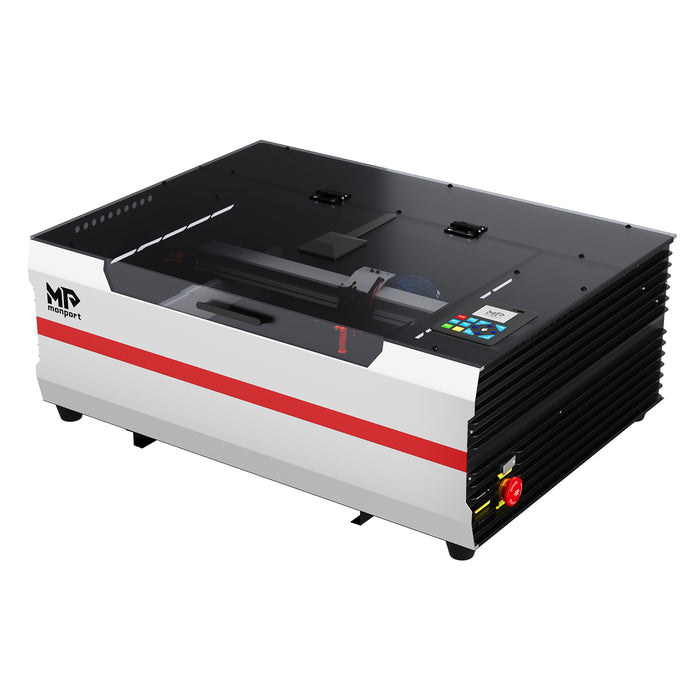
A modern desktop laser cutter is compact enough to fit on a workbench while still delivering professional-quality results. At the same time, a dependable home laser cutter should be easy to learn, safe to operate, and powerful enough to handle different materials. If you're looking for a machine that balances speed, precision, and convenience, the Monport Reno45 Pro Vision deserves a closer look.

Why More Australians Are Choosing a Desktop Laser Cutter
A desktop laser cutter is no longer something only large workshops can afford. Compact machines have become more capable, making them a smart choice for hobbyists, side hustles, and even small businesses operating from home.
A quality home laser cutter lets you create products whenever inspiration strikes. Instead of waiting for outsourced cutting services, you stay in control of your projects from start to finish.
Some of the most popular home projects include:
-
Custom wooden signs
-
Acrylic LED lamps
-
Wedding decorations
-
Personalised drink coasters
-
Leather wallets and keyrings
-
Jewellery organisers
-
Christmas ornaments
-
School craft projects
Because a desktop laser cutter handles both engraving and cutting, it gives you much more flexibility than traditional crafting tools.
What Makes a Good Home Laser Cutter?
Not every home laser cutter is built the same. Before buying one, it's worth comparing several important features instead of looking only at power.
Cutting Performance
A capable desktop laser cutter should cut cleanly through wood, acrylic, leather, cardboard, rubber, and many other compatible materials. Consistent cutting reduces wasted material and saves finishing time.
Easy Positioning
One of the biggest frustrations for beginners is lining up designs correctly. A good home laser cutter should simplify positioning so every project starts accurately.
Software Compatibility
Look for machines that work with popular software such as LightBurn. This makes designing, editing, and importing files much easier, whether you're a beginner or already experienced.
Room to Grow
Many people buy a desktop laser cutter for hobbies but eventually begin selling products online. Choosing a machine with professional-level features means you won't outgrow it quickly.
Why the Monport Reno45 Pro Vision Stands Out
Among today's desktop machines, the Monport Reno45 Pro Vision 45W Desktop CO2 Laser Engraver & Cutter is one of the strongest options for Australian makers.
Designed for both beginners and experienced users, it combines powerful cutting with smart camera technology that speeds up setup and improves overall accuracy.
Its specifications include:
-
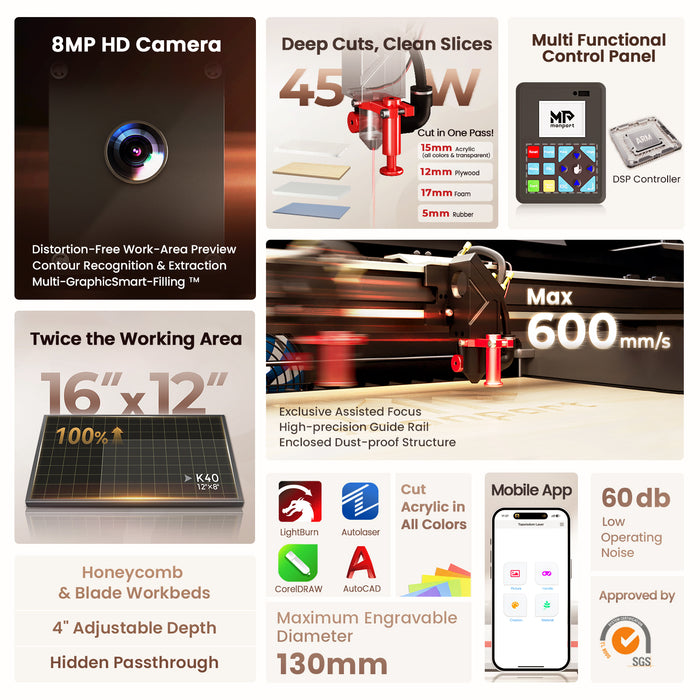
Working area: 16" × 12" (400 × 300 mm)
-
Machine size: 800 × 575 × 285 mm
-
Weight: 30 kg (67 lb)
-
Z-axis movement: 100 mm (4 inches)
-
Maximum engraving speed: 600 mm/s
-
Magnetic Assisted Focus system
-
Compatible with LightBurn Pro, Autolaser, and TopwisdomLaser mobile app
These features allow the home laser cutter to complete detailed engraving and fast cutting without sacrificing quality.
Smarter Features That Save Time
One reason many users choose Monport is its intelligent camera system.
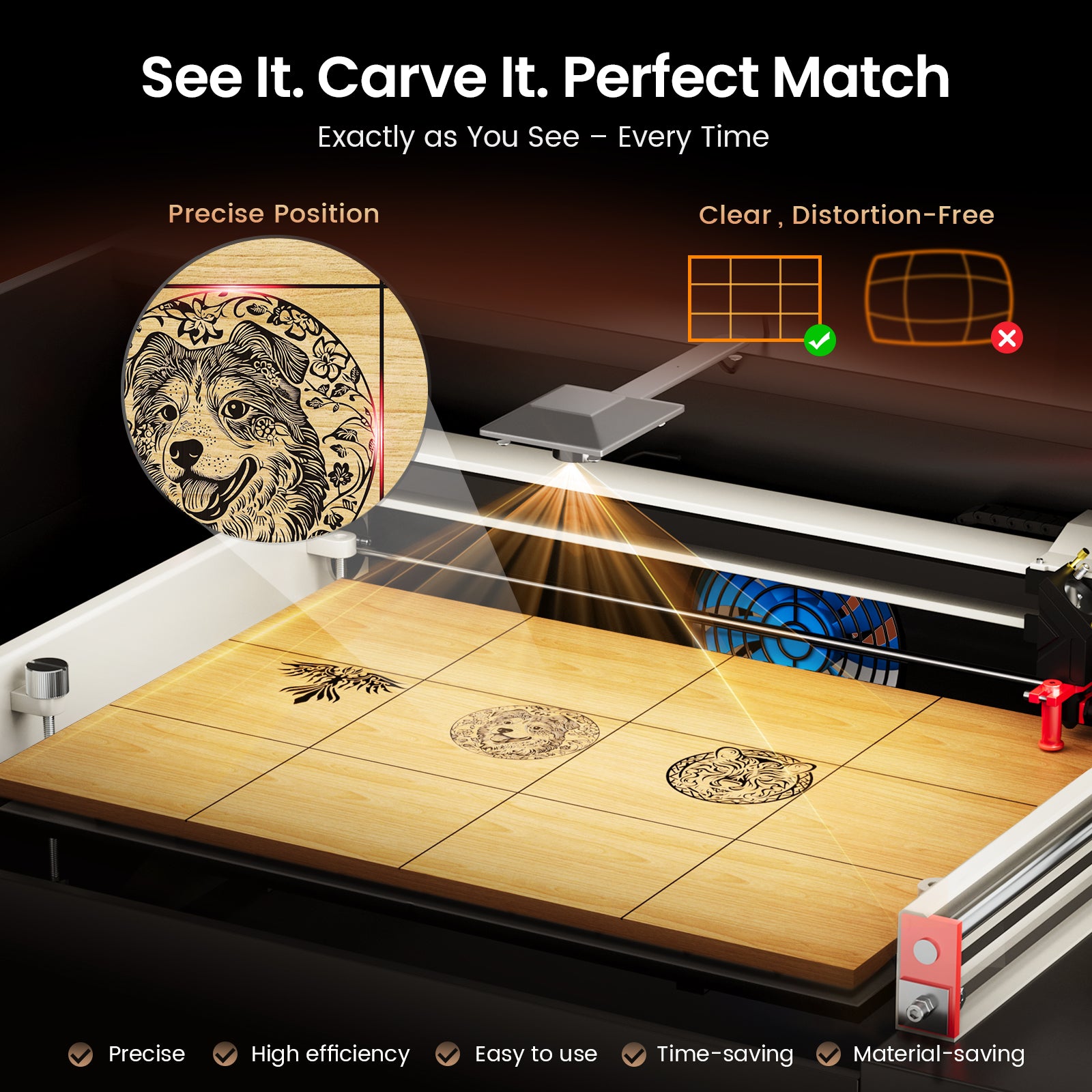
The built-in 8MP panoramic camera scans materials in only a few seconds, giving a distortion-free preview of the entire work area. Instead of guessing where your design will appear, you can position it precisely before engraving begins.
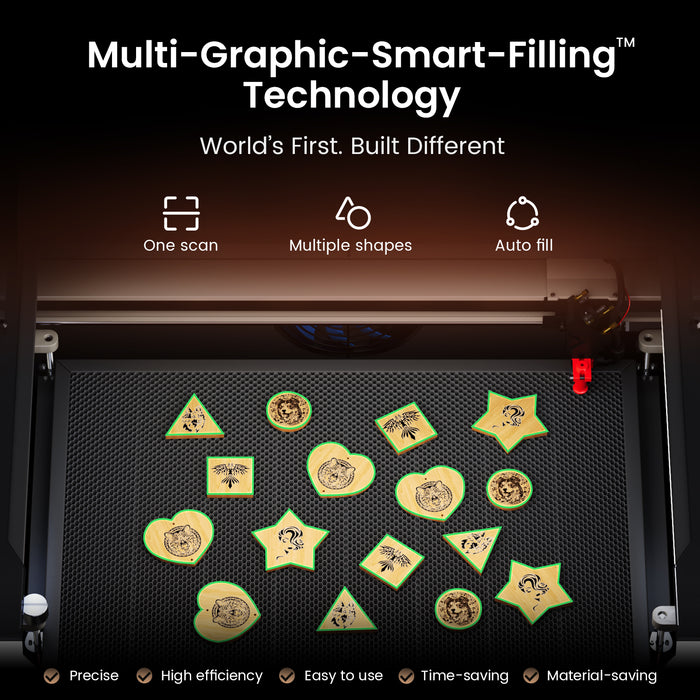
Another standout feature is Monport's Multi-Graphic Smart Filling Technology. The system automatically recognises different material shapes and fills multiple designs across the workspace in one operation. This is especially useful when producing batches of coasters, tags, ornaments, or personalised gifts.
The camera also performs automatic contour recognition, generating outlines without manual tracing. That saves both production time and material, making the desktop laser cutter much more efficient for repeat projects.
Ready to upgrade your workshop? Shop Now and discover the Monport Reno45 Pro Vision. Use exclusive blog code AUBLOG888 at checkout to enjoy additional savings on your purchase.
Creative Project Ideas You Can Make at Home

Once you have a reliable desktop laser cutter, you'll quickly realise how many different projects you can create without needing a large workshop. Whether you're making items for yourself or planning to sell online, a quality machine gives you plenty of opportunities.
Here are some popular projects Australian makers enjoy:
-
Personalised chopping boards
-
Acrylic business signs
-
Home décor and wall art
-
Wedding place cards
-
Cake toppers
-
Leather wallets
-
Name plaques
-
Christmas ornaments
-
Pet tags
-
Educational puzzles
-
Jewellery organisers
-
Custom gifts for birthdays and anniversaries
A dependable home laser cutter makes it easier to produce consistent results, even when you're making several items at once. If you're running a small Etsy shop or selling at local markets, this can save hours of work every week.
Why the Reno45 Pro Vision Outperforms Standard K40 Machines
Many people begin comparing the Reno45 Pro Vision with a standard K40 laser cutter. While both are desktop machines, the differences become obvious once you start using them.
The Monport Reno45 Pro Vision delivers stronger cutting performance, better engraving accuracy, and a much smoother user experience. Instead of spending time making manual adjustments, you can focus on creating projects.
Magnetic Assisted Focus
Setting the correct focus can be frustrating for beginners.
Monport solves this with its exclusive Magnetic Assisted Focus system. The magnetic tool allows users to achieve accurate focus within seconds, reducing setup time while improving engraving quality.
Whether you're creating detailed artwork or cutting thicker materials, the machine stays easy to operate.
8MP Camera and Automatic Positioning
One of the biggest advantages of this desktop laser cutter is its intelligent 8MP panoramic camera.
The camera provides a distortion-free preview of the work area, making it simple to position designs exactly where they belong.
It also supports automatic contour recognition and outline extraction. Instead of tracing designs manually, the software creates accurate cutting paths automatically. This not only saves time but also reduces wasted material.
If you're engraving leftover wood or acrylic pieces, the camera helps maximise every usable section.
Built for Speed and Precision
Monport redesigned the Reno series with lightweight components, high-precision guide rails, customised motors, and improved motion control.
This allows the Reno45 Pro Vision to reach engraving speeds of up to 600 mm/s while maintaining excellent accuracy.
Fast production doesn't mean sacrificing quality. Small text, detailed graphics, and intricate patterns remain sharp and clean throughout the engraving process.
Powerful Cutting Performance
Another area where the Reno45 Pro Vision shines is cutting capability.
Thanks to Monport's independently developed laser tube and premium reflective and focusing lenses, the machine delivers stronger cutting power than many entry-level alternatives.
It can cut acrylic up to 15 mm thick, making it suitable for signs, display stands, decorative panels, and many other creative projects.
Combined with its 16 × 12-inch working area, this home laser cutter offers enough space for most hobby and small-business applications without taking over your workshop.
Who Should Buy This Home Laser Cutter?
The Monport Reno45 Pro Vision is suitable for a wide range of users.
It works well for:
-
DIY hobbyists
-
Home-based craft businesses
-
Etsy sellers
-
Teachers and schools
-
Sign makers
-
Gift businesses
-
Makerspaces
-
Designers looking for precise engraving and cutting
Whether you're creating one custom gift or producing dozens of products every week, this desktop laser cutter provides the performance needed to grow with your projects.
Discover More about the Monport Reno45 Pro Vision and use blog code AUBLOG888 for exclusive savings. It's a great opportunity to upgrade your workshop while getting better value for your investment.
Frequently Asked Questions
Is the Monport Reno45 Pro Vision suitable for beginners?
Yes. The Magnetic Assisted Focus, intuitive software compatibility, and camera-assisted positioning make it much easier for beginners to learn.
What materials can this home laser cutter process?
It works with wood, acrylic, leather, cardboard, paper, rubber, fabric, and many other compatible non-metal materials.
Does it support LightBurn?
Yes. The Reno45 Pro Vision is compatible with LightBurn Pro, Autolaser, and TopwisdomLaser, giving users flexible design options.
Can I use it for a small business?
Absolutely. Its high engraving speed, batch processing features, and accurate camera system make it suitable for producing products for online shops and local markets.
Why choose Monport over a standard K40 machine?
The Reno45 Pro Vision offers a larger working area, faster engraving speed, camera-assisted positioning, contour recognition, Magnetic Assisted Focus, stronger cutting capability, and better overall productivity.
Key Takeaways
-
A desktop laser cutter is an excellent investment for hobbyists and home businesses.
-
The Monport Reno45 Pro Vision combines speed, precision, and beginner-friendly features.
-
The 8MP camera improves positioning and reduces material waste.
-
Magnetic Assisted Focus makes setup faster and easier.
-
Smart Filling Technology increases productivity for batch projects.
-
The machine cuts acrylic up to 15 mm thick and engraves at speeds up to 600 mm/s.
-
LightBurn compatibility provides an easy workflow for both beginners and experienced users.
Conclusion
Choosing the best desktop laser cutter for home use comes down to reliability, accuracy, and ease of use. The Monport Reno45 Pro Vision delivers all three while adding smart camera technology, fast engraving speeds, and powerful cutting performance that help both beginners and experienced makers produce professional-quality results.
Whether your goal is creating personalised gifts, decorating your home, or building a profitable side business, this home laser cutter gives you the tools to complete projects with confidence. Instead of upgrading again in a year or two, investing in a capable machine from the start allows you to tackle bigger ideas as your skills grow.
Shop Now and experience the Monport Reno45 Pro Vision for yourself. Don't forget to use blog code AUBLOG888 to receive exclusive discounts and make your next laser engraving project even more rewarding.

